从 Capacitor 4 更新到 Capacitor 5
与之前的升级相比,Capacitor 4 和 5 之间的破坏性变化非常少。在本指南中,您将找到将项目更新到当前 Capacitor 5 版本的步骤,以及我们官方插件的破坏性更改列表。
NodeJS 16+
Node 12 已达到生命周期终点。Node 14 将于 2023 年 4 月 30 日达到生命周期终点。Capacitor 5 需要 NodeJS 16 或更高版本。(建议使用最新的 LTS 版本。)
使用 CLI 迁移
将 latest-5 版本的 Capacitor CLI 安装到您的项目:
npm i -D @capacitor/cli@latest-5
安装后,只需运行以下命令即可让 CLI 为您处理迁移:
npx cap migrate
如果迁移的任何步骤无法完成,终端输出中将提供额外信息。下面列出了手动迁移的步骤。
使用 VS Code 扩展迁移
如果您安装了 VS Code 扩展,只需查看扩展的 recommendations 部分,找到将项目迁移到 Capacitor 5 的选项。
iOS
以下指南描述了如何将您的 Capacitor 4 iOS 项目升级到 Capacitor 5。
升级 Xcode
Capacitor 5 需要 Xcode 14.1+。
更新 .gitignore
对您的 .gitignore 文件进行以下更改:
- App/Podfile.lock
+ App/output
更新资源以使用单个应用图标
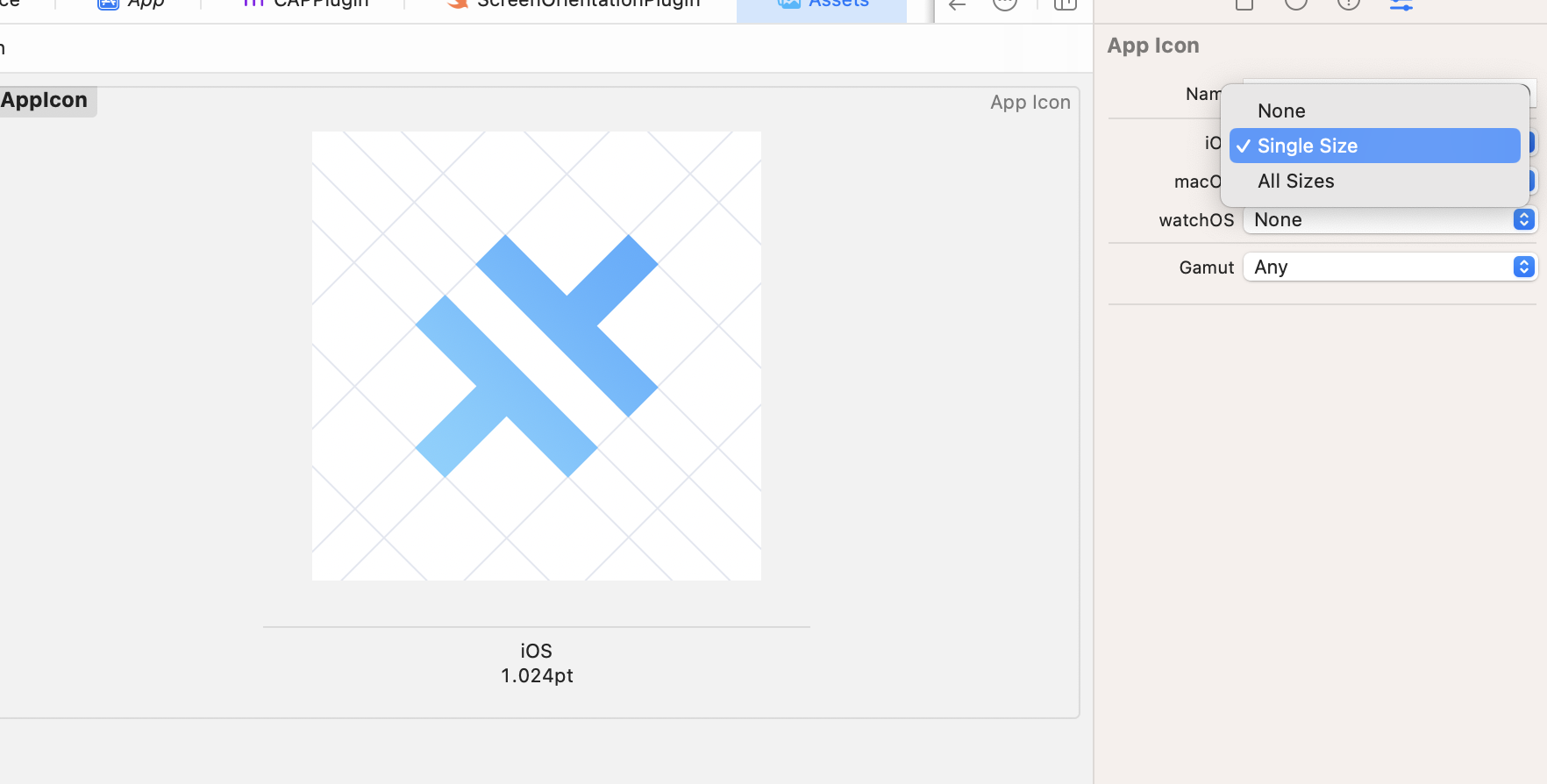
Xcode 14 支持 1024x1024 的单个应用图标,因此您可以通过移除所有不必要的尺寸来清理 AppIcon.appiconset。
Android
以下指南描述了如何将您的 Capacitor 4 Android 项目升级到 Capacitor 5。
升级 Android Studio
Capacitor 5 需要 Android Studio Flamingo | 2022.2.1 或更新版本,因为使用了 Gradle 8,这需要 Java JDK 17。Java 17 随 Android Studio Flamingo 一起提供。无需额外下载!
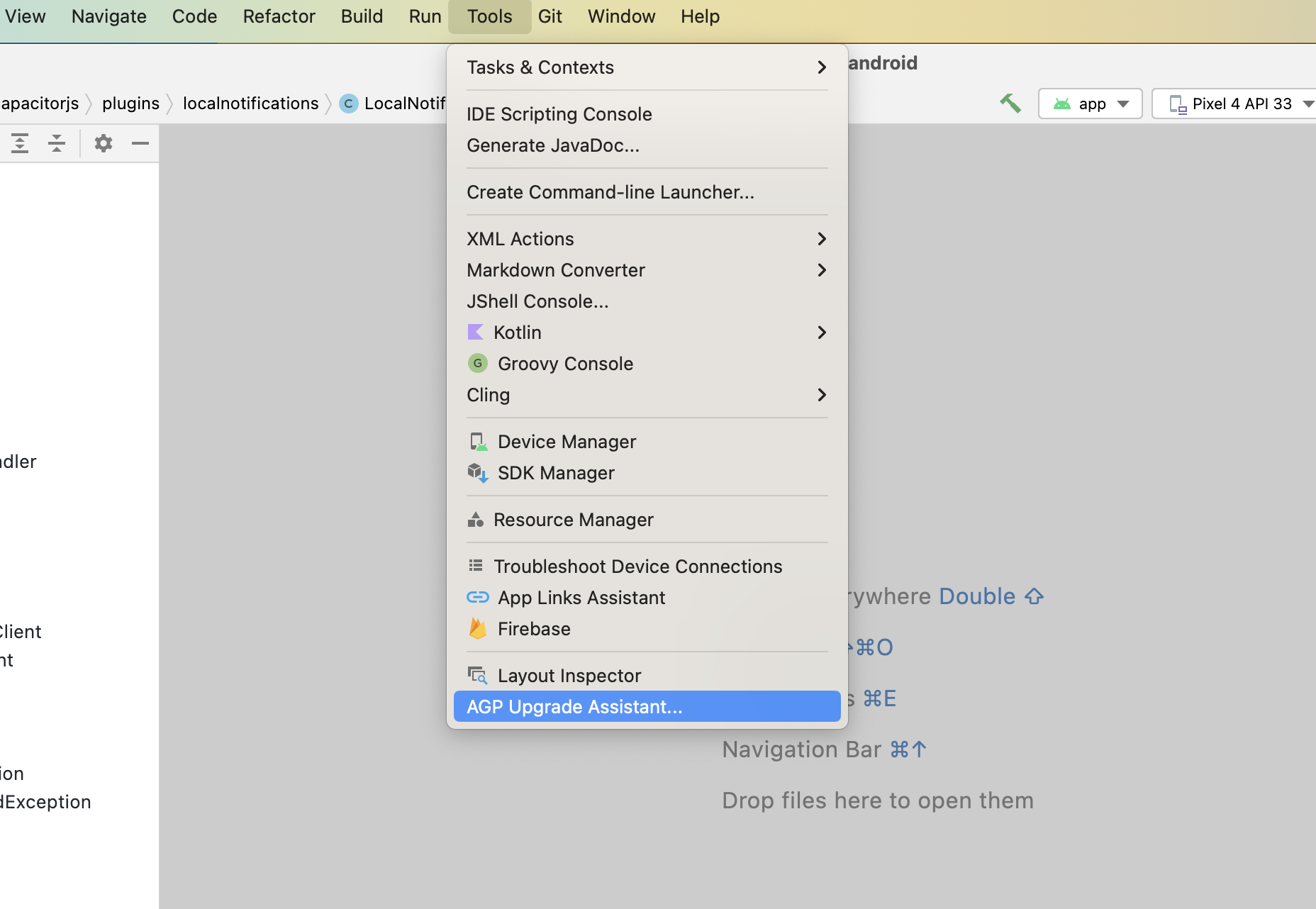
更新后,Android Studio 可以协助处理一些与 gradle 相关的更新以及将包移动到构建文件中。要开始,请运行 Tools -> AGP Upgrade Assistant。
更新 Android 项目变量
在您的 variables.gradle 文件中,将值更新为以下新的最小值:
minSdkVersion = 22
compileSdkVersion = 33
targetSdkVersion = 33
androidxActivityVersion = '1.7.0'
androidxAppCompatVersion = '1.6.1'
androidxCoordinatorLayoutVersion = '1.2.0'
androidxCoreVersion = '1.10.0'
androidxFragmentVersion = '1.5.6'
coreSplashScreenVersion = '1.0.0'
androidxWebkitVersion = '1.6.1'
junitVersion = '4.13.2'
androidxJunitVersion = '1.1.5'
androidxEspressoCoreVersion = '3.5.1'
cordovaAndroidVersion = '10.1.1'
更新 Google Services
# build.gradle

    dependencies {
-       classpath 'com.google.gms:google-services:4.3.13'
+       classpath 'com.google.gms:google-services:4.3.15'
更新 gradle 插件到 8.0.0
# build.gradle

    dependencies {
-       classpath 'com.android.tools.build:gradle:7.2.1'
+       classpath 'com.android.tools.build:gradle:8.0.0'
更新 gradle wrapper 到 8.0.2
# gradle-wrapper.properties

distributionBase=GRADLE_USER_HOME
distributionPath=wrapper/dists
- distributionUrl=https\://services.gradle.org/distributions/gradle-7.4.2-all.zip
+ distributionUrl=https\://services.gradle.org/distributions/gradle-8.0.2-all.zip
zipStoreBase=GRADLE_USER_HOME
zipStorePath=wrapper/dists
禁用 Jetifier
如果您没有任何仍然使用旧的 android support 库而不是等效的 AndroidX 库的插件,请移除这一行。
# gradle.properties

# Android operating system, and which are packaged with your app's APK
# https://developer.android.com/topic/libraries/support-library/androidx-rn
android.useAndroidX=true
- # Automatically convert third-party libraries to use AndroidX
- android.enableJetifier=true
将包移动到 build.gradle
# AndroidManifest.xml

<?xml version="1.0" encoding="utf-8"?>
- <manifest xmlns:android="http://schemas.android.com/apk/res/android"
-     package="[YOUR_PACKAGE_ID]">
+ <manifest xmlns:android="http://schemas.android.com/apk/res/android">
# build.gradle

android {
+     namespace "[YOUR_PACKAGE_ID]"
      compileSdkVersion rootProject.ext.compileSdkVersion
更新 androidScheme
在 Capacitor 6 中,https 将成为现有应用的 androidScheme 的默认设置,以更好地使 Capacitor 应用能够利用系统的自动填充功能。
更改 scheme 相当于在不同的域名上发布您的应用,这意味着存储在 cookies、localstorage 等中的数据将不再可访问。为避免因这次更改而导致数据丢失,在您的 Capacitor 配置文件中,您现在应该将 scheme 设置为 http,即使它是当前的默认值。
{
  server: {
    androidScheme: 'http';
  }
}
更新 kotlin 版本
如果您的项目使用 kotlin,请将 kotlin_version 变量更新为 '1.8.20'。
插件
以下插件功能已被修改或移除。请相应更新您的代码。
Action Sheet
androidxMaterialVersion变量已更新为1.8.0。
Browser
androidxBrowserVersion变量已更新为1.5.0。
Camera
- Android 13 要求在
AndroidManifest.xml中声明读取媒体图片权限(<uses-permission android:name="android.permission.READ_MEDIA_IMAGES"/>)。 androidxMaterialVersion变量已更新为1.8.0。androidxExifInterfaceVersion变量已更新为1.3.6。
Device
DeviceId.uuid更改为DeviceId.identifier- 在 iOS 16+ 上,除非您添加适当的 entitlements,否则
DeviceInfo.name将返回通用的设备名称。
Geolocation
playServicesLocationVersion已更新为21.0.1。
Google Maps
googleMapsPlayServicesVersion已更新为18.1.0。googleMapsUtilsVersion已更新为3.4.0。googleMapsKtxVersion已更新为3.4.0。googleMapsUtilsKtxVersion已更新为3.4.0。kotlinxCoroutinesVersion已更新为1.6.4。androidxCoreKTXVersion已更新为1.10.0。kotlin_version已更新为1.8.20。
Local Notifications
- Android 13 需要新的运行时权限检查才能调度本地通知。当目标 SDK 为 33 时,您需要相应地调用
checkPermissions()和requestPermissions()。
Push Notifications
- Android 13 需要新的运行时权限检查才能接收推送通知。当目标 SDK 为 33 时,您需要相应地调用
checkPermissions()和requestPermissions()。 firebaseMessagingVersion变量已更新为23.1.2。
Status Bar
- 在 iOS 上,默认状态栏动画已更改为
FADE。