推送通知
推送通知 API 提供了注册设备以接收来自服务器的通知的方法,以及处理接收到的通知并对其做出响应的方法。相比之下,本地通知 API 提供了离线本地通知安排和处理的手段。
启用推送通知功能
在 iOS 上,您必须在项目中启用推送通知功能才能使推送通知插件正常工作。为此,请转到应用项目的 Capabilities 部分,将 Push Notifications 按钮从 OFF 切换到 ON 位置。
此更改将为应用添加推送功能,并在项目中创建一个 entitlements 文件。

在 Android 上,只需从 Firebase 控制台下载应用项目的 google-services.json 文件,并将其放置在 projectName/android/app 文件夹中。
推送通知图标
在 Android 上,应将具有适当名称的推送通知图标添加到 AndroidManifest.xml 文件中:
<meta-data android:name="com.google.firebase.messaging.default_notification_icon" android:resource="@mipmap/push_icon_name" />
如果未指定图标,Android 将使用应用图标,但推送图标应为透明背景上的白色像素。由于应用图标通常不是这样,它会显示一个白色方块或圆形。因此建议为推送通知提供单独的图标。
Android Studio 有一个图标生成器,您可以使用它来创建推送通知图标。
禁用推送通知插件
如果您在项目中未使用推送通知,则在将应用提交到 iTunes Connect 时,Apple 会向您发送一封邮件,指出由于 Missing Push Notification Entitlement 而存在问题。这是因为 Capacitor 包含了注册推送通知和获取 token 的代码。
Apple 发送该邮件只是为了确保您没有犯错误并忘记在应用中启用推送通知功能,但如果您不使用推送通知插件,可以安全地忽略它。
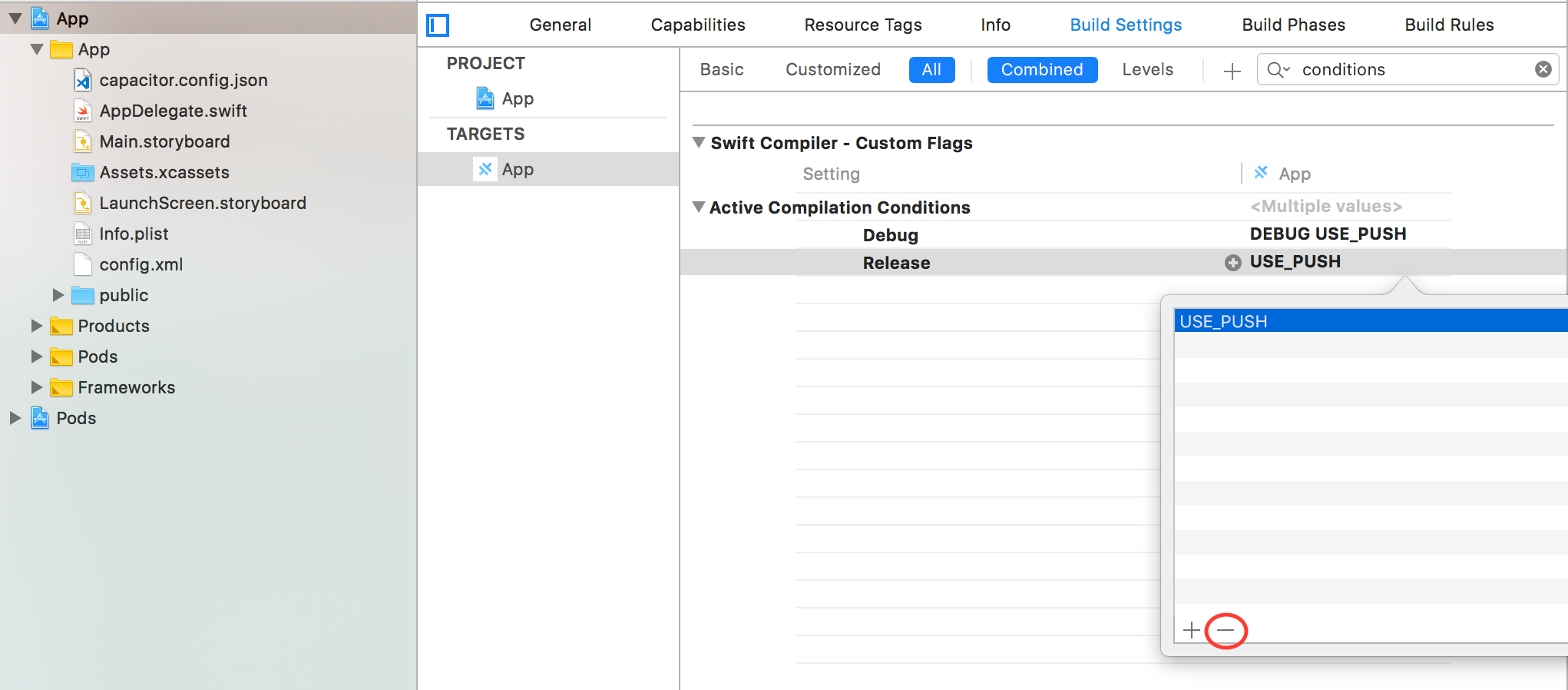
如果您不想收到该邮件,可以通过在项目的 Build Settings 部分中将 USE_PUSH 从 Active Compilation Conditions 中移除来禁用推送通知插件。
前台推送通知的显示
在 iOS 上,您可以通过在 capacitor.config.json 中提供 presentationOptions(可组合的字符串数组)来配置应用在前台时推送通知的显示方式。
可能的值有:
badge:应用图标上的角标计数被更新(默认值)sound:收到推送通知时设备会响铃/振动alert:推送通知显示在原生对话框中
如果不需要上述任何选项,可以提供一个空数组。pushNotificationReceived 事件仍将携带推送通知信息被触发。
"plugins": {
  "PushNotifications": {
    "presentationOptions": ["badge", "sound", "alert"]
  }
}
register()requestPermission()getDeliveredNotifications()removeDeliveredNotifications(...)removeAllDeliveredNotifications()createChannel(...)deleteChannel(...)listChannels()addListener(...)addListener(...)addListener(...)addListener(...)removeAllListeners()- 接口
示例指南
在 Ionic Angular 应用中使用 Firebase 推送通知
API
register()
register() => Promise<void>
注册应用以接收推送通知。 将触发 registration 事件并返回推送 token, 如果出现问题则触发 registrationError。 不会提示用户授予通知权限,请先使用 requestPermission()。
requestPermission()
requestPermission() => Promise<NotificationPermissionResponse>
在 iOS 上,提示用户允许显示通知 并返回权限是否已授予。 在 Android 上没有此类提示,因此直接返回已授予。
返回:
Promise<NotificationPermissionResponse>getDeliveredNotifications()
getDeliveredNotifications() => Promise<PushNotificationDeliveredList>
返回通知屏幕上可见的通知。
返回:
Promise<PushNotificationDeliveredList>removeDeliveredNotifications(...)
removeDeliveredNotifications(delivered: PushNotificationDeliveredList) => Promise<void>
从通知屏幕中移除指定的通知。
| 参数 | 类型 | 描述 |
|---|---|---|
delivered | | 已投递的通知列表。 |
removeAllDeliveredNotifications()
removeAllDeliveredNotifications() => Promise<void>
从通知屏幕中移除所有通知。
createChannel(...)
createChannel(channel: NotificationChannel) => Promise<void>
在 Android O 或更新版本(SDK 26+)上创建通知频道。
| 参数 | 类型 | 描述 |
|---|---|---|
channel | | 要创建的频道。 |
deleteChannel(...)
deleteChannel(channel: NotificationChannel) => Promise<void>
在 Android O 或更新版本(SDK 26+)上删除通知频道。
| 参数 | 类型 | 描述 |
|---|---|---|
channel | | 要删除的频道。 |
listChannels()
listChannels() => Promise<NotificationChannelList>
在 Android O 或更新版本(SDK 26+)上列出可用的通知频道。
返回:
Promise<NotificationChannelList>addListener(...)
addListener(eventName: 'registration', listenerFunc: (token: PushNotificationToken) => void) => PluginListenerHandle
推送通知注册成功完成时调用的事件。 提供推送通知 token。
| 参数 | 类型 | 描述 |
|---|---|---|
eventName | "registration" | registration。 |
listenerFunc | | 携带推送 token 的回调。 |
返回:
PluginListenerHandleaddListener(...)
addListener(eventName: 'registrationError', listenerFunc: (error: any) => void) => PluginListenerHandle
推送通知注册出现问题完成时调用的事件。 提供带有注册问题的错误。
| 参数 | 类型 | 描述 |
|---|---|---|
eventName | "registrationError" | registrationError。 |
listenerFunc | (error: any) => void | 带有注册错误的回调。 |
返回:
PluginListenerHandleaddListener(...)
addListener(eventName: 'pushNotificationReceived', listenerFunc: (notification: PushNotification) => void) => PluginListenerHandle
设备收到推送通知时调用的事件。
| 参数 | 类型 | 描述 |
|---|---|---|
eventName | "pushNotificationReceived" | pushNotificationReceived。 |
listenerFunc | | 带有接收到的通知的回调。 |
返回:
PluginListenerHandleaddListener(...)
addListener(eventName: 'pushNotificationActionPerformed', listenerFunc: (notification: PushNotificationActionPerformed) => void) => PluginListenerHandle
对推送通知执行操作时调用的事件。
| 参数 | 类型 | 描述 |
|---|---|---|
eventName | "pushNotificationActionPerformed" | pushNotificationActionPerformed。 |
listenerFunc | | 带有通知操作的回调。 |
返回:
PluginListenerHandleremoveAllListeners()
removeAllListeners() => void
移除该插件的所有原生监听器。
接口
NotificationPermissionResponse
| 属性 | 类型 |
|---|---|
granted | boolean |
PushNotificationDeliveredList
| 属性 | 类型 |
|---|---|
notifications | PushNotification[] |
PushNotification
| 属性 | 类型 | 描述 |
|---|---|---|
title | string | |
subtitle | string | |
body | string | |
id | string | |
badge | number | |
notification | any | |
data | any | |
click_action | string | |
link | string | |
group | string | 仅 Android:设置通知分组的组标识符,类似于 iOS 上的 threadIdentifier。 |
groupSummary | boolean | 仅 Android:将此通知指定为组的摘要(应与 group 属性一起使用)。 |
NotificationChannel
| 属性 | 类型 |
|---|---|
id | string |
name | string |
description | string |
sound | string |
importance | 1 | 2 | 5 | 4 | 3 |
visibility | 0 | 1 | -1 |
lights | boolean |
lightColor | string |
vibration | boolean |
NotificationChannelList
| 属性 | 类型 |
|---|---|
channels | NotificationChannel[] |
PluginListenerHandle
| 属性 | 类型 |
|---|---|
remove | () => void |
PushNotificationToken
| 属性 | 类型 |
|---|---|
value | string |
PushNotificationActionPerformed
| 属性 | 类型 |
|---|---|
actionId | string |
inputValue | string |
notification | |